

AI is good at the writing and admin around a deal: listing description drafts, social posts, lead replies, follow-up reminders, inbox sorting, calendar work, notes and summaries. It’s bad at the parts that carry your license: pricing a home, advising a client, talking about who lives in a neighborhood, and anything sent or posted without your review.
One rule keeps you out of trouble: AI drafts, you check and send. NAR and Ontario’s regulator, RECO, both put the responsibility for AI output on the agent.
Below are the 12 tasks worth handing off, the 5 that should stay with you, which kind of tool fits each, a prompt you can paste for each one, and the US and Canadian rules that apply.
AI drafts, you check and send
AI drafts
Writing and admin
- Listing descriptions and social posts
- Replies to new leads
- Follow-up lists and reminders
- Notes, summaries and market updates
You check
Before anything goes out
- Every fact against the listing file
- Every number against your source
- No words about who the home suits
- Names, dates and consent
You send
And keep the licensed work
- Approve, then send or post
- Price and value
- Advice and negotiation
- Neighborhood questions
NAR and Ontario's regulator, RECO, both put the responsibility for AI output on the agent.
The short list
| # | Task | Good tool type | Your job after |
|---|---|---|---|
| 1 | Listing description drafts | Chatbot (ChatGPT, Gemini, Claude) | Check every fact against the listing file |
| 2 | Social posts and captions | Chatbot or design tool with AI | Add brokerage ID, check photos |
| 3 | First replies to new leads | Email assistant or AI agent | Approve before it goes out |
| 4 | Follow-up lists and reminders | AI agent or CRM with AI | Decide who gets a personal call |
| 5 | Inbox triage | Email assistant or AI agent | Read what it flags as urgent |
| 6 | Calendar and showing logistics | AI agent with calendar access | Confirm times with people |
| 7 | Notes into action items | Transcription plus a chatbot or agent | Fix names and dates |
| 8 | Market update drafts | Chatbot, with your numbers pasted in | Check every number |
| 9 | Open house follow-up | Email assistant or AI agent | Personalize the top leads |
| 10 | Deadline tracking | AI agent or CRM with AI | Keep the contract as the source |
| 11 | Summaries of long documents | Chatbot (with client consent) | Read the sections that matter |
| 12 | Listing appointment prep | Chatbot with web search | Verify sources before you quote them |
| # | Keep it with you | Why |
|---|---|---|
| 1 | Setting a list price or giving a value | Your judgement and your liability |
| 2 | Advice and negotiation | Licensed work; you answer for it |
| 3 | "Is this a good neighborhood?" answers | Steering risk under fair housing law |
| 4 | AI voice calls and mass texts to cold contacts | Consent rules (TCPA, CASL) |
| 5 | Changing what the home looks like in photos without saying so | Disclosure rules (California, Ontario) and your ad rules |
How agents use AI right now
NAR’s 2026 technology report, released in September 2026, found that 23% of agents use AI daily and 25% weekly. The share who don’t use it at all fell to 21%, from 32% a year earlier. Among agents who use AI, 91% use ChatGPT, 42% use Gemini and 27% use Copilot. The most common jobs are listing descriptions (75% of AI users) and social media posts (56%).
How agents use AI in 2026
How often agents use AI
Tools used, among agents who use AI
Most common jobs, among agents who use AI
NAR 2026 technology report, released September 2026, as reported by Inman. Sources at the end of the page.
So most of your competitors already have a chatbot open. The useful questions now are which tasks you let it touch and who checks the output.
There are three kinds of tools in play:
- Chatbots (ChatGPT, Gemini, Claude). You paste something in, you get a draft out. They don’t see your email or calendar unless you connect them, and they don’t remember your clients between chats unless you set that up.
- Built-in AI in tools you already pay for: your CRM, your email, your design app. Easiest to start with, limited to what that tool can see.
- AI agents or assistants that work across your email, calendar and files, keep lists, and remind you. More useful for follow-up and admin, and the ones that need the most care with permissions.
Chatbots
ChatGPT, Gemini, Claude
- How it works
- You paste something in, you get a draft out.
- What it sees
- Only what you paste, unless you connect your email or calendar.
- Watch for
- It doesn't remember your clients between chats unless you set that up.
Built-in AI
In your CRM, email or design app
- How it works
- AI features inside tools you already pay for.
- What it sees
- Only what that tool can see.
- Watch for
- Easiest to start with, limited to that one tool.
AI agents
Across email, calendar and files
- How it works
- Keeps lists, reminds you, drafts across your accounts.
- What it sees
- Your email, calendar and files.
- Watch for
- Most useful for follow-up and admin, and needs the most care with permissions.
12 tasks AI can handle
1. Listing description drafts
Give the AI the facts (beds, baths, square footage, upgrades, lot, what the sellers love about the place) and ask for two versions in your voice. You’ll get a usable first draft in seconds.
The risk is invented detail. AI will add “quartz counters” or “steps to the park” if it sounds right. RECO’s AI guidance tells Ontario agents to check AI-written descriptions against the property documents before publishing, and that’s good practice everywhere. Also strip out anything that describes who the home is for (“perfect for a young family”), which is a fair housing problem in the US.
Write two listing descriptions, 120 and 200 words, from the facts below. Use only these facts and don't add features. Don't describe the ideal buyer or the neighbors. Plain, warm tone, no exclamation marks. Facts: [paste].
2. Social posts and captions
Turning one listing into five posts (just listed, open house, price change, under contract, sold) is exactly the kind of repetitive writing AI does well. Ask for captions in a set length per platform and a few hook options.
What you check: brokerage identification (required in Ontario under TRESA advertising rules, and usually by your brokerage and state rules in the US), the photos you attach, and any claim about the market.
From this listing description, write five short posts: just listed, open house Saturday 1 to 4, price update, under contract, sold. Each under 60 words, one question at the end, no hashtags. Description: [paste].
3. First replies to new leads
A drafted reply waiting in your inbox beats a perfect reply you write three hours later. An email assistant or agent can read the inquiry, pull in the listing details and draft a reply that answers the question and asks one of its own.
Keep it on drafts you approve, at least until you trust it. A reply that promises a showing time you can’t make, or says something about the property that isn’t true, is your problem, not the software’s.
Draft a reply to this inquiry. Answer their question using only the listing facts below, offer two showing times from my availability, and ask whether they're working with an agent. Under 120 words. Inquiry: [paste]. Facts: [paste]. Availability: [paste].
4. Follow-up lists and reminders
The past client you meant to call in March is the easiest one to lose track of. AI is good at keeping the list: who you last spoke to, what they said, when to check in next, and a draft note for each one.
You decide who gets a personal call instead of an email, because you know which clients expect one. The follow-up email templates work well as the base for these drafts.
Here are my notes on 20 past clients. For each, give the date of last contact, one personal detail to mention and a two-line check-in email. Flag anyone who mentioned moving in the next year. Notes: [paste].
5. Inbox triage
An agent’s inbox mixes leads, lender updates, title emails, showing confirmations and newsletters. AI can sort it into “reply today”, “waiting on someone” and “read later”, and draft answers to the routine ones.
Read everything it flags as urgent yourself. If a tool can send email on its own, check what it’s allowed to do before you connect it.
Sort these emails into three groups: reply today, waiting on someone, read later. For each "reply today" email, draft a reply of two or three lines. Don't promise any date, price or showing time. Emails: [paste].
6. Calendar and showing logistics
Back-and-forth about times is pure overhead. An assistant with calendar access can propose slots, add showings and inspections to your calendar, and remind you the night before. Tools differ a lot here: some only read your calendar, some can add and change events.
Confirm times with the people involved. An event on your calendar doesn’t mean the buyer agreed to come.
Here's my calendar for next week and three showing requests. Propose two times for each request that leave 30 minutes of travel between appointments, and draft a short confirmation message for each. Calendar: [paste]. Requests: [paste].
7. Notes into action items
After a listing appointment or a buyer consult, talk for two minutes into a voice note or paste your rough notes. AI turns that into a clean summary and a to-do list with dates. We wrote a full walkthrough of this in meeting notes to an action list.
Fix names, numbers and dates before you rely on the list. Transcription gets street names and surnames wrong more often than anything else.
Turn these notes into: a three-line summary, a to-do list with owner and due date, and a short recap email to the client. Ask me about anything unclear instead of guessing. Notes: [paste].
8. Market update drafts
A monthly market email or post works when it’s specific: your area, your numbers. AI is good at turning a table of local stats into readable sentences and a short “what this means if you’re selling” paragraph.
Paste the numbers in yourself from your MLS or board report. Don’t ask a chatbot what the median price was last month; it may give you a confident number that’s wrong. Then check every figure in the draft against your source.
Using only the numbers below, write a 150-word market update for [area] and two sentences on what it means if you're thinking of selling. Don't add any number that isn't in the table. Numbers: [paste].
9. Open house follow-up
Sign-ins on Saturday, follow-ups on Monday morning: this is one of the most useful handoffs. Feed in your sign-in sheet and get a drafted email for each visitor, sorted by how serious they seemed.
Personalize the top few by hand. Our open house follow-up templates give you the sequence for the first 72 hours.
Here are today's open house sign-ins with my notes. Sort visitors into hot, warm and browsing, and draft a follow-up email for each that mentions one thing they said. Under 100 words each. Sign-ins: [paste].
10. Deadline tracking
Inspection contingency, appraisal, financing, final walk-through: AI can turn the dates from an accepted offer into a checklist with reminders, and draft the “just a reminder” emails to the other parties.
The contract stays the source of truth, and if you use a transaction coordinator, they still own the file. Treat AI reminders as a backup.
From these contract dates, make a checklist of every deadline with the date, who's responsible and a reminder two days before. List any date you couldn't find instead of guessing. Dates: [paste].
11. Summaries of long documents
Inspection reports, condo documents and HOA rules run long. AI can summarize them and point you to the sections that need a closer look (roof, foundation, special assessments, rental limits).
Read the flagged sections yourself before you say anything to a client.
These documents also contain client and property details. RECO tells Ontario agents not to put personal, financial or confidential client data into public AI platforms, and to get explicit written consent before entering client details or contract terms into AI tools. Even outside Ontario, check your brokerage’s policy and the tool’s data settings first.
Summarize this inspection report in ten bullets, most serious first, as the report rates them. Give the page number for each item. Don't say whether the buyer should go ahead. Report: [paste, with client names and contact details removed].
12. Listing appointment prep
Before a listing appointment, AI with web search can pull together public facts about the property and the area, outline your presentation and draft answers to the questions sellers usually ask.
Treat it as a research assistant that needs checking. Click through to the sources, and don’t quote anything you couldn’t find again.
Find public information about [address] and its area: recent nearby sales, zoning and planned developments. Give a link for every fact. Don't describe who lives in the area. Then outline a 20-minute listing presentation.
5 tasks AI shouldn’t do
1. Set a price or give a value
AI and automated valuation models can give you a range to start from. They can’t walk the house, see the cracked foundation, or know that the street floods every spring. Your list price recommendation is a professional opinion you’ll have to defend to the seller, and later to an appraiser and a buyer’s agent. Let AI format your CMA once you’ve done the analysis.
2. Give advice or negotiate
“Should we accept?”, “Can we ask for more?”, “Is this inspection item a deal-breaker?” are questions clients pay you to answer.
NAR’s position is that AI should complement, not replace, an agent’s judgement and local expertise. RECO says the same in stronger terms: AI is for support only, never a replacement for professional judgement, and agents stay accountable for everything they communicate. Use AI to word your advice once you’ve decided what it is.
3. Answer “is this a good neighborhood?”
Buyers ask chatbots and assistants about safety, schools and “what kind of people live there”. Answers that describe an area by its residents, or point buyers toward or away from areas based on race, religion, national origin, sex, disability or family status, can be steering under the Fair Housing Act. HUD withdrew its 2024 guidance on AI and digital advertising in 2025, but the Act itself didn’t change, and HUD says it still enforces anything that violates it.
If you run a chatbot on your website, give it a fixed answer for these questions that points buyers to public data sources and to you.
4. Make AI voice calls or mass texts to cold contacts
In February 2024 the FCC ruled that AI-generated voices count as “artificial” voices under the TCPA. Marketing calls using them need the person’s prior express written consent, the same as robocalls. Texts to cell phones carry their own consent rules. In Canada, CASL requires consent, identification and an unsubscribe option for commercial electronic messages, which covers emails and texts an AI drafts for you.
If a vendor promises AI that cold calls expired listings for you, ask what consent you’ll have for each number. Penalties are counted per call.
5. Change what the home looks like in photos without saying so
Virtual staging, removing a power line or swapping a grey sky for blue are easy with AI tools. Since January 1, 2026, California’s AB 723 (Business and Professions Code §10140.8) requires agents to label digitally altered listing images and link to the originals. Lighting, cropping, color correction and other common edits that don’t change how the property looks are exempt. RECO tells Ontario agents to clearly label digitally altered images and keep permanent features accurate.
Check your state or provincial rules and your MLS rules. If you’re not sure, label it and show the original.
Rules that apply when you use AI (US and Canada)
| Rule | Where | What it means for AI use |
|---|---|---|
| Fair Housing Act | US | No describing buyers or neighbors by protected class, no steering. Applies to AI-written copy and chatbot answers |
| TCPA, FCC ruling of Feb 2024 | US | AI voice calls need consent like any prerecorded call |
| CAN-SPAM | US | Marketing emails need a real sender, a physical address and a working opt-out |
| California AB 723 | California | Label altered listing photos and link to the originals (from Jan 1, 2026) |
| CASL | Canada | Consent, sender ID and unsubscribe for commercial emails and texts |
| TRESA and RECO AI guidance | Ontario | Verify AI output, label altered images, brokerage ID in ads, no client data in public AI tools without written consent |
| Your brokerage and MLS rules | Both | Often stricter than the law on photos, ads and data |
This is a summary to help you ask the right questions, not legal advice. Your broker of record and your regulator have the final word.
How to start without making a mess
- Pick two tasks, not twelve. Listing descriptions and open house follow-up are the easiest wins for most agents.
- Write down your voice. Paste three emails you’re proud of into the tool and ask it to match the tone. Save the result as a standing instruction.
- Keep a “facts only” rule in every prompt. Most AI mistakes in real estate copy are invented features.
- Stay on drafts. Don’t let any tool send in your name until you’ve reviewed a few weeks of its drafts.
- Check the data settings. Before you paste client details, know whether the tool stores or trains on what you enter, and get consent where your rules require it.
- Review once a month. Drop the tasks where you’re rewriting most of the output.
If you’re weighing AI against hiring help, our virtual assistant vs AI assistant guide splits the work task by task, with cost math.
Where Brainmox fits
Brainmox is your own AI agent, set up with you by our team. It covers the admin side of this list: it writes your Gmail replies and either sends them for you or saves them as drafts, depending on the access you pick (Read-only, Draft or Full). It adds and updates events in Google Calendar, keeps follow-up lists and reminders, and remembers your clients and how you write. You talk to it in the desktop app, the web app, Telegram, Slack or WhatsApp, and it works in web-based tools in its own browser.
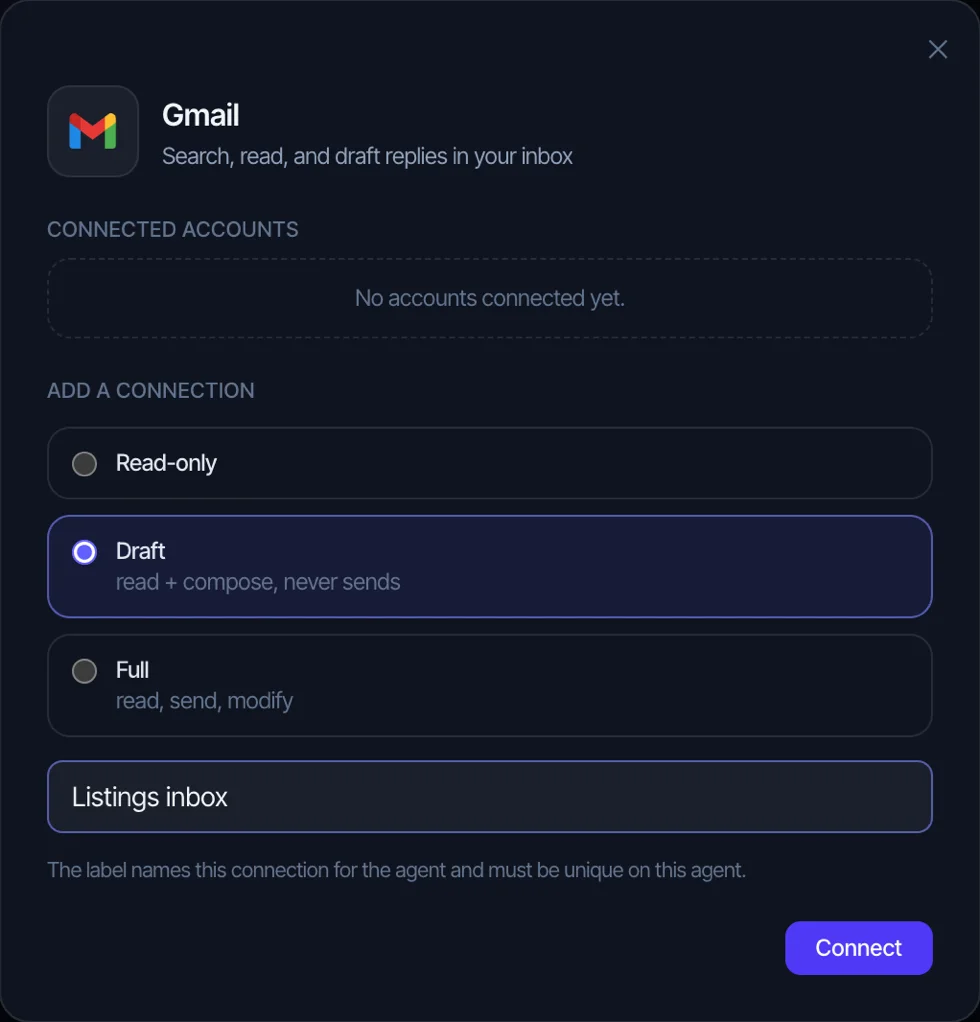
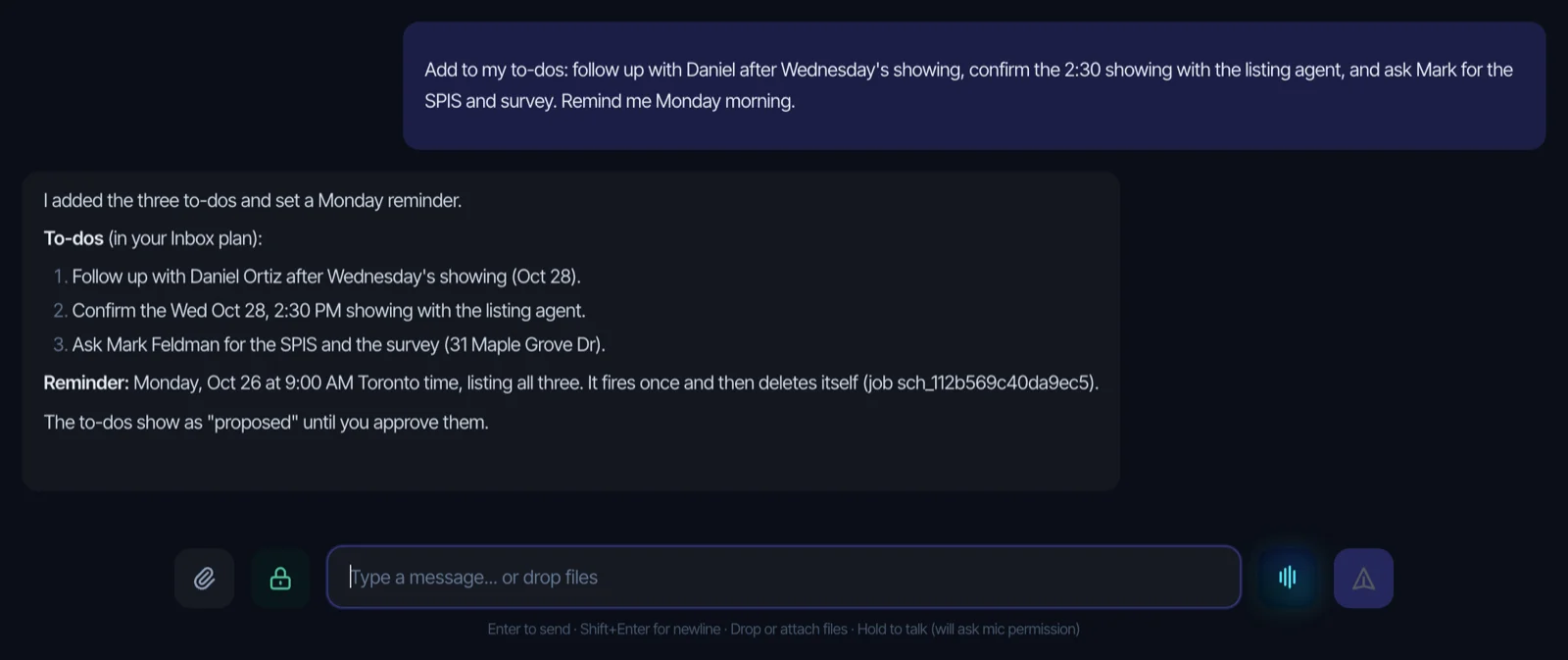
It doesn’t make or answer phone calls, text leads or sync with your CRM. It’s in private beta in the US and Canada at a private-beta price of $299 a month. See how it works for real estate agents or the Gmail drafting walkthrough with real saved drafts.
FAQ
How can a real estate agent use AI?
For writing and admin: listing description drafts, social posts, replies to new leads, follow-up reminders, inbox sorting, calendar work, meeting notes and document summaries. The agent checks every draft before it’s sent or posted.
What AI do real estate agents use?
ChatGPT by a wide margin. In NAR’s 2026 technology report, 91% of agents who use AI use ChatGPT, 42% use Gemini and 27% use Copilot. Many also use AI built into their CRM, email or design tools.
Will AI replace real estate agents?
Not the licensed part of the job. Pricing, advising, negotiating and being responsible for the deal stay with a person, and regulators like RECO say that AI doesn’t take over the agent’s professional obligations. What AI replaces is a share of the typing and admin.
Is it legal to use AI for listing descriptions?
Yes, as long as the description is accurate and doesn’t break fair housing or advertising rules. You’re responsible for what’s published under your name, so check every fact and remove any language about who the home suits.
Do I have to tell clients I use AI?
The rules we cite here don’t require a general disclosure. California does require labels on digitally altered listing photos. In Ontario, RECO asks for written consent from clients before you enter their personal details or contract terms into AI tools. Check your brokerage policy too.
What’s the best AI tool for real estate agents?
It depends on the task. A general chatbot covers most writing. For follow-up and admin across email and calendar, an assistant or agent that connects to those accounts does more. Start with the two tasks that eat most of your week and pick the tool that handles those.
Sources
- Inman, report on NAR’s 2026 technology survey, September 22, 2026
- NAR, Artificial Intelligence in Real Estate (topic page, read November 5, 2026)
- RECO, Guidance: Use of Artificial Intelligence (read November 5, 2026)
- California AB 723 (Chapter 497, Statutes of 2025), Business and Professions Code §10140.8
- HUD, Notification of Withdrawal of Fair Housing and Equal Opportunity Guidance Documents, 91 FR 17291, April 6, 2026
- FCC Declaratory Ruling FCC 24-17 (AI-generated voices under the TCPA), February 8, 2024, summarized by Wiley
- FTC, CAN-SPAM Act: A Compliance Guide for Business
- Canada’s Anti-Spam Legislation (CASL), S.C. 2010, c. 23, sections 1 and 6