

Real estate agents use ChatGPT to draft listing descriptions, client emails, social posts, market notes and document summaries. It’s good at turning your facts into clean copy. It’s bad at knowing facts you didn’t give it, so it will invent a renovated kitchen if you let it. The fix is a 10-minute setup and one rule in every prompt: use only the facts below. Here’s that setup, then 25 prompts you can copy.
Download all 25 prompts and the setup text (free, no signup)
- Prompts and setup (Word): edit the brackets, then paste into ChatGPT
- Prompts and setup (PDF): print it or keep it open next to ChatGPT
Disclosure: we make Brainmox, an AI agent for admin work, and mention it once near the end. ChatGPT settings and plan details below come from OpenAI’s help center, checked November 21, 2026. The prompts are ours. We haven’t published sample outputs, because ChatGPT answers differ from run to run: test each prompt on a fictional listing before you use it with a client.
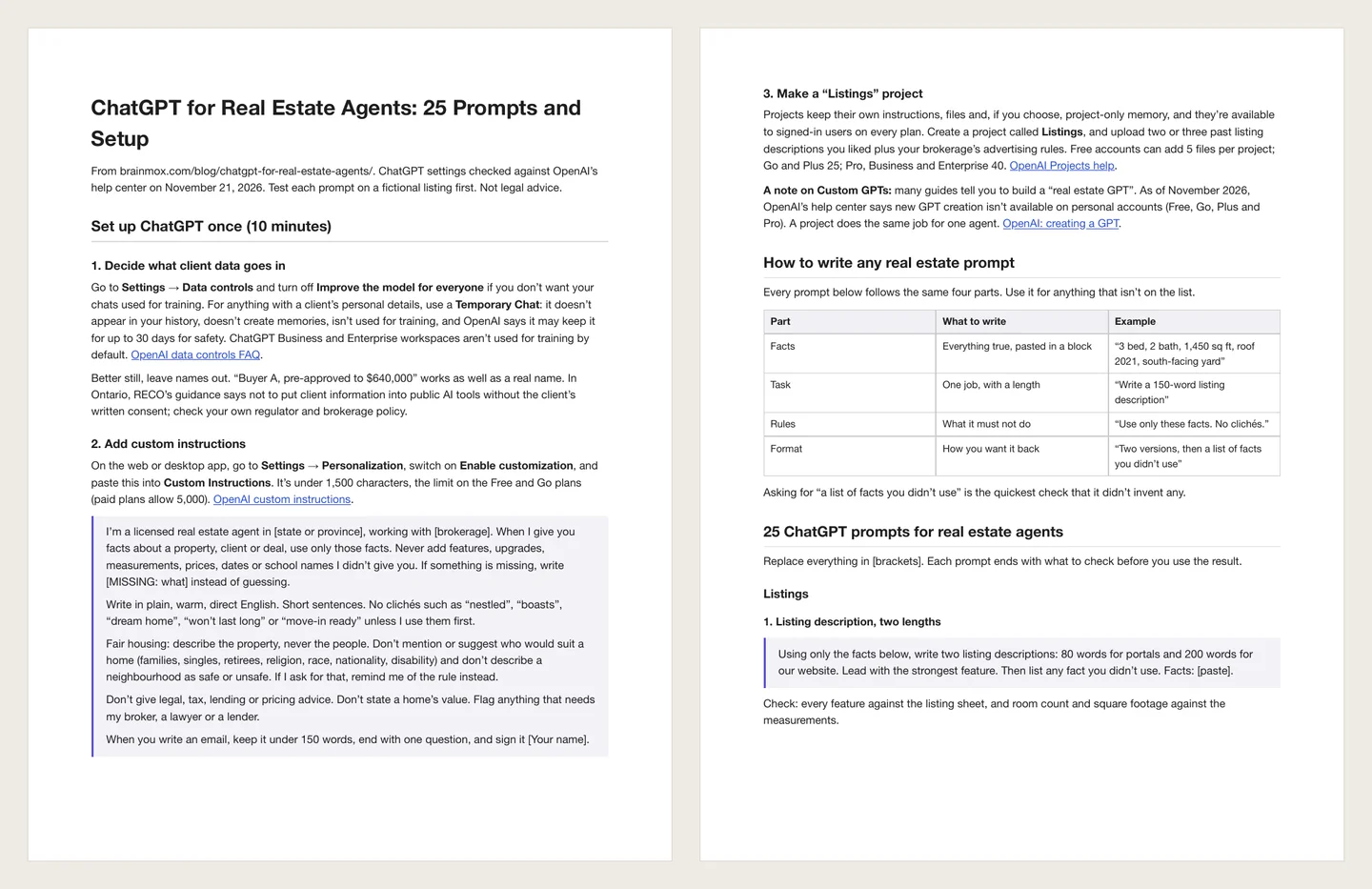
Set up ChatGPT once (10 minutes)
1. Decide what client data goes in
Go to Settings → Data controls and turn off Improve the model for everyone if you don’t want your chats used for training. For anything with a client’s personal details, use a Temporary Chat: it doesn’t appear in your history, doesn’t create memories, isn’t used for training, and OpenAI says it may keep it for up to 30 days for safety. ChatGPT Business and Enterprise workspaces aren’t used for training by default. OpenAI data controls FAQ.
Better still, leave names out. “Buyer A, pre-approved to $640,000” works as well as a real name. In Ontario, RECO’s guidance says not to put client information into public AI tools without the client’s written consent; check your own regulator and brokerage policy.
2. Add custom instructions
On the web or desktop app, go to Settings → Personalization, switch on Enable customization, and paste this into Custom Instructions. It’s under 1,500 characters, the limit on the Free and Go plans (paid plans allow 5,000). OpenAI custom instructions.
I'm a licensed real estate agent in [state or province], working with [brokerage]. When I give you facts about a property, client or deal, use only those facts. Never add features, upgrades, measurements, prices, dates or school names I didn't give you. If something is missing, write [MISSING: what] instead of guessing.
Write in plain, warm, direct English. Short sentences. No clichés such as "nestled", "boasts", "dream home", "won't last long" or "move-in ready" unless I use them first.
Fair housing: describe the property, never the people. Don't mention or suggest who would suit a home (families, singles, retirees, religion, race, nationality, disability) and don't describe a neighbourhood as safe or unsafe. If I ask for that, remind me of the rule instead.
Don't give legal, tax, lending or pricing advice. Don't state a home's value. Flag anything that needs my broker, a lawyer or a lender.
When you write an email, keep it under 150 words, end with one question, and sign it [Your name].
3. Make a “Listings” project
Projects keep their own instructions, files and, if you choose, project-only memory, and they’re available to signed-in users on every plan. Create a project called Listings, and upload two or three past listing descriptions you liked plus your brokerage’s advertising rules. Free accounts can add 5 files per project; Go and Plus 25; Pro, Business and Enterprise 40. OpenAI Projects help.
A note on Custom GPTs: many guides tell you to build a “real estate GPT”. As of November 2026, OpenAI’s help center says new GPT creation isn’t available on personal accounts (Free, Go, Plus and Pro). A project does the same job for one agent. OpenAI: creating a GPT.
How to write any real estate prompt
Every prompt below follows the same four parts. Use it for anything that isn’t on the list.
| Part | What to write | Example |
|---|---|---|
| Facts | Everything true, pasted in a block | "3 bed, 2 bath, 1,450 sq ft, roof 2021, south-facing yard" |
| Task | One job, with a length | "Write a 150-word listing description" |
| Rules | What it must not do | "Use only these facts. No clichés." |
| Format | How you want it back | "Two versions, then a list of facts you didn't use" |
Asking for “a list of facts you didn’t use” is the quickest check that it didn’t invent any.
25 ChatGPT prompts for real estate agents
Replace everything in [brackets]. Each prompt ends with what to check before you use the result.
Listings
1. Listing description, two lengths
Using only the facts below, write two listing descriptions: 80 words for portals and 200 words for our website. Lead with the strongest feature. Then list any fact you didn't use. Facts: [paste].
Check: every feature against the listing sheet, and room count and square footage against the measurements.
2. Rewrite a weak description
Here's my current listing description. Rewrite it to be clearer and more specific without adding any new facts. Remove clichés. Then list the changes you made. Description: [paste].
Check: that no new fact slipped in.
3. Feature sheet for the open house
Turn these facts into a one-page feature sheet: a 2-line intro, 8 bullet points grouped by inside, outside and updates, and a "Good to know" line for taxes and fees. Use only these facts: [paste].
Check: taxes, fees and update years against the documents.
4. Photo captions and alt text
For each photo below, write a 10-word caption and alt text that describes what's visible for someone who can't see it. Don't describe people or who would live there. Photos: [list room and what's in each photo].
Check: captions match the actual photos, in order.
5. Fair housing check on your copy
Review this listing copy for wording that describes people instead of the property, suggests who the home suits, or describes the area as safe or unsafe. Quote each phrase and suggest a property-focused replacement. Copy: [paste].
Check: this is a second pair of eyes, not a compliance review. Your broker has the final word.
Marketing and social
6. Five posts from one listing
From this listing description, write five short social posts: just listed, open house [day/time], price update, under contract, sold. Under 60 words each, no hashtags in the text, then 5 hashtags at the end. Description: [paste].
Check: dates and prices, and that “sold” goes out only after closing and with the seller’s OK.
7. Video script for a walkthrough
Write a 45-second walkthrough script for a phone video of this home, room by room in this order: [rooms]. Say what to film for each line. Use only these facts: [paste].
Check: the room order matches how you’ll walk it.
8. Market update from your numbers
Using only these numbers for [area] last month, write a 150-word market update and two sentences on what it means for someone thinking of selling. No predictions. Numbers: [median price, sales, days on market, active listings, same month last year].
Check: every number against your MLS or board report, and the source line under the update.
9. Newsletter section
Write a short newsletter section with three parts: one local market fact from the numbers below, one home maintenance tip for [month] in [climate or region], and one line inviting readers to reply with questions. 200 words total. Numbers: [paste].
Check: the tip suits your climate, and the newsletter has an unsubscribe line.
10. Ideas for a month of posts
Give me 20 social post ideas for a real estate agent in [area] for [month], mixing listings, local events I'll fill in, home tips and behind-the-scenes. One line each. Don't invent local events; write [EVENT] where I should add one.
Check: you fill every [EVENT] with something real.
Clients and email
11. First reply to a new lead
Draft a reply to this inquiry. Answer their question using only the listing facts below, offer two showing times from my availability, and end with one question. Under 120 words. Inquiry: [paste]. Facts: [paste]. Availability: [paste].
Check: the times are still free on your calendar.
12. Follow-up after a showing
Write a follow-up email to a buyer who saw [address] today. They liked [detail] and worried about [detail]. Offer one useful next step. Under 100 words.
Check: you got their likes and worries right.
13. Explain a process in plain words
Explain [the offer process / a home inspection / conditions and deadlines] to a first-time buyer in [state or province], in under 200 words, at a grade 8 reading level. Write [CHECK] next to any step that varies by contract or location.
Check: every [CHECK] line against your contract and local practice. This is general information, not advice.
14. Reply to a tricky email, calmly
Here's an email from a client who's upset about [issue]. Draft a calm reply that acknowledges the problem, says what I'll do next by [date], and doesn't admit fault or promise an outcome. Under 150 words. Email: [paste].
Check: the next step is one you can deliver, and your broker sees it first if it’s a complaint.
15. Turn a voice note into an email
Here's a transcript of my voice note after a call with a seller. Turn it into a short recap email to the seller with what we agreed, what I'll do, what they'll do, and dates. Write [MISSING] for any date I didn't say. Transcript: [paste].
Check: every agreement matches what was said on the call.
Transactions and documents
16. Deadline checklist from contract dates
From these contract dates, make a checklist of every deadline: the date, what's due, who's responsible and a reminder two days before. Sort by date. Dates: [paste from the signed agreement].
Check: every date against the signed contract, line by line.
17. Inspection report summary
Summarize this inspection report in 10 bullets, most serious first, as the report rates them. Give the page number for each. Don't add opinions on cost or urgency. Report: [paste or upload].
Check: the page numbers, and read the serious items in the original yourself.
18. Condo or HOA document summary
Summarize these condo/HOA documents: fees and what they cover, special assessments, rules on rentals, pets and renovations, and anything about upcoming repairs. Quote the section for each point. Documents: [upload].
Check: quoted sections exist. Send the buyer the original documents, not just the summary.
19. Closing checklist for the client
Write a closing checklist for my [buyer/seller] in [state or province]: what to do 2 weeks before, 1 week before, the day before and on the day. Write [CHECK] next to anything that varies by location.
Check: each [CHECK] line, and who handles closing where you work (lawyer, notary or title company).
20. Comparison table for a buyer
Make a table comparing these three homes on price, size, bedrooms, bathrooms, lot, taxes, fees, age of roof and furnace, and distance to [place]. Use only the facts given; write "unknown" where a fact is missing. Homes: [paste].
Check: no “unknown” got filled in with a guess.
Your business and admin
21. Listing presentation outline
Outline a 20-minute listing presentation for [address]: introduction, how I'd market it, recent nearby sales (I'll add the numbers), my communication plan and next steps. Write [ADD] where I should add my own data.
Check: you price the home yourself, from real comparable sales.
22. Past client check-in list
Here are notes on my past clients. For each, give the date of last contact, one personal detail to mention and a two-line check-in message. Sort by longest since contact. Notes: [paste, names removed if you prefer].
Check: details are current, and nothing private goes into a message.
23. Weekly plan
Here's my week: appointments, deadlines and goals. Build a time-blocked plan with lead follow-up every morning, two prospecting blocks and buffer time between showings. Flag any conflict. Week: [paste].
Check: travel time between showings.
24. Bio for your website
Write a 120-word professional bio from these facts: years licensed, areas, specialties, one personal detail and how clients can reach me. First person, no superlatives, no awards I didn't list. Facts: [paste].
Check: licence wording and brokerage name follow your regulator’s advertising rules.
25. Objection practice
Act as a seller who wants to list above the comparable sales I give you. Push back three times in a realistic way. After each of my replies, tell me what was clear and what was weak. Sales: [paste].
Check: it’s practice. Don’t send its arguments to a real seller as advice.
What not to ask ChatGPT
- A price or a value. It doesn’t have live MLS data, and a number from a chatbot isn’t a comparative market analysis.
- Legal, tax or lending advice for a client. Use it to prepare questions for the professional.
- “Is this a good neighbourhood?” That’s a steering risk. Point buyers to public data sources and let them decide.
- Edited listing photos without a label. Altered photos need to be disclosed in some places, such as California from January 1, 2026.
For the full list of tasks AI should and shouldn’t handle, see AI for real estate agents.
Rules that apply when you use AI (US and Canada)
| Rule | Where | What it means for ChatGPT use |
|---|---|---|
| Fair Housing Act | US | No describing buyers or neighbours by protected class, no steering. Applies to AI-written copy |
| CAN-SPAM | US | Marketing emails need a real sender, a physical address and a working opt-out |
| California AB 723 | California | Label altered listing photos and link to the originals (from Jan 1, 2026) |
| CASL | Canada | Consent, sender ID and unsubscribe for commercial emails and texts |
| TRESA and RECO AI guidance | Ontario | Verify AI output, label altered images, brokerage ID in ads, no client data in public AI tools without written consent |
| Your brokerage and MLS rules | Both | Often stricter than the law on photos, ads and data |
This is a summary to help you ask the right questions, not legal advice. Your broker of record and your regulator have the final word.
Where ChatGPT stops, and an agent takes over
Most agents use ChatGPT as a writing tool: paste facts in, copy text out, then move it into email, the calendar and a follow-up list by hand. That last step is where the evening goes.
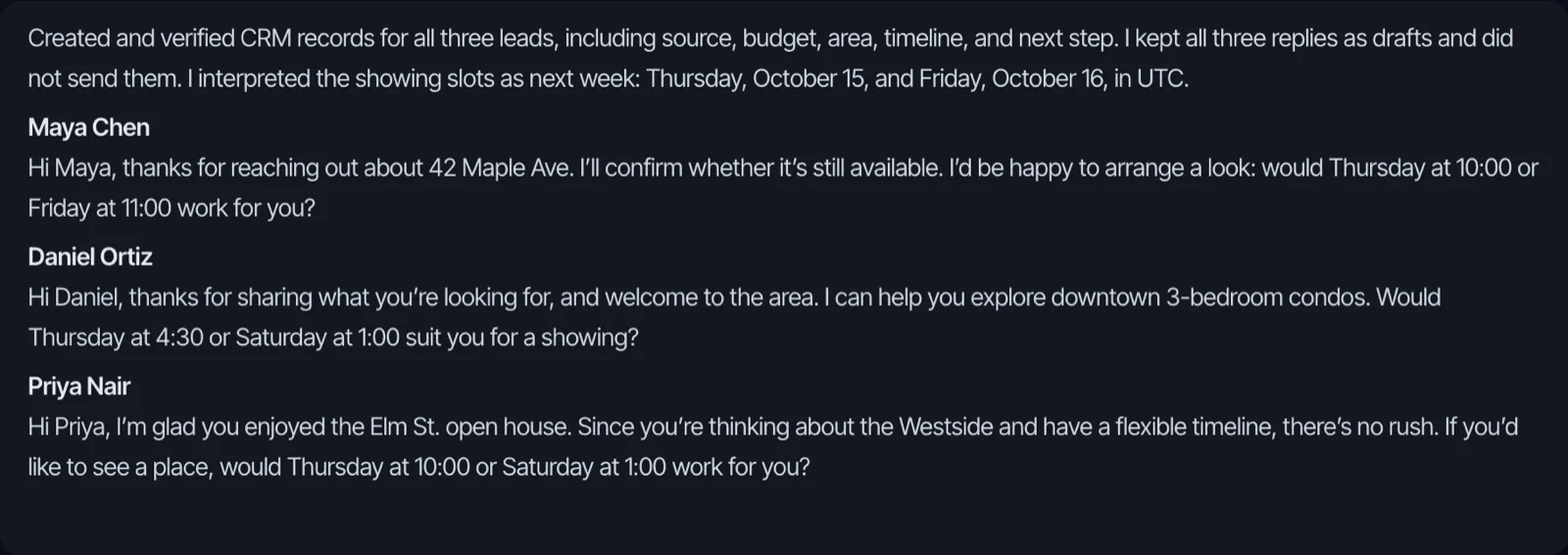
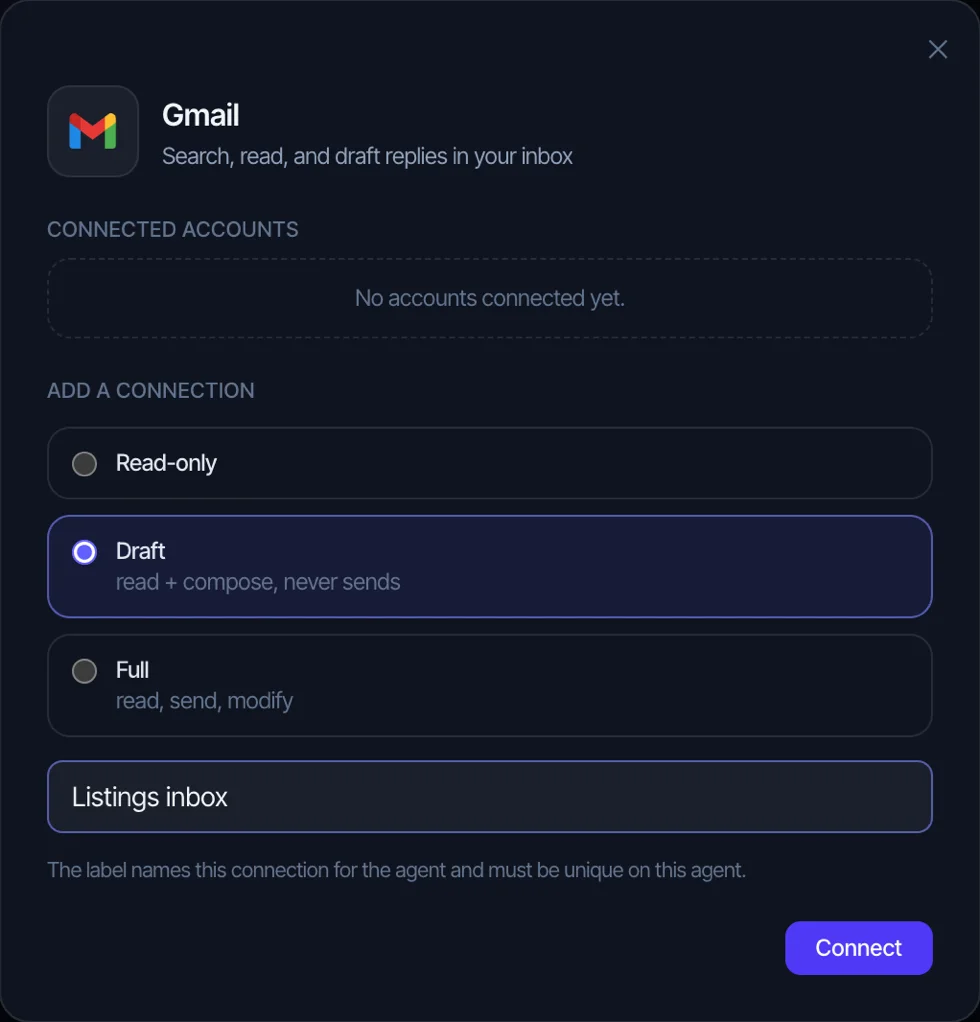
Brainmox is your own AI agent, set up with you by a person on our team. It drafts emails in your Gmail or Outlook (with draft-only access, you send them), adds showings and deadlines to your calendar, keeps your follow-up list and reminders, and remembers your clients and how you write. It doesn’t make calls, text leads or sync with your CRM. See how it works for real estate agents, or copy-ready emails in real estate email templates.
FAQ
How do real estate agents use ChatGPT?
Most use it for writing: listing descriptions, client emails, social posts, newsletters, market updates and summaries of long documents. The agents who get good results give it the facts and tell it not to add any.
Can ChatGPT write listing descriptions?
Yes, if you give it every fact and tell it to use only those. Ask it to list the facts it didn’t use, then check every feature against the listing sheet. Run a fair housing check on the final copy (prompt 5).
Is it safe to put client information into ChatGPT?
Leave names and personal details out where you can. If you must include them, turn off “Improve the model for everyone” and use a Temporary Chat, and follow your brokerage’s policy. In Ontario, RECO’s guidance asks for the client’s written consent first.
Can I make a custom GPT for real estate?
Not on a personal account. As of November 2026, OpenAI says new GPT creation isn’t available on Free, Go, Plus or Pro. A Project with its own instructions and files does the same job for one agent.
Is the free version of ChatGPT enough?
For occasional listing descriptions and emails, yes. Free accounts get shorter custom instructions (1,500 characters) and fewer project files (5). If you use it every day, a paid plan gives you more room.
Related
- AI for real estate agents: 12 tasks AI can handle and 5 it shouldn’t
- Real estate email templates: 20 copy-paste emails
- Open house follow-up: 8 email and text templates
- Real estate virtual assistant vs AI assistant