

An action-items template turns meeting notes into a list of agreed tasks: what needs doing, who owns it, when it is due and what still needs clarification. Keep the source note beside each task so the person reviewing the list can check it.
Download the action-items template
Download these original CSV and Markdown templates without an account. The CSV contains the column headers, ready for your own rows; open it in Excel or import it into Google Sheets. The Markdown version includes a blank table and review checklist.
- Download the blank CSV template
- Download the Markdown template and checklist
- Download the completed fictional example CSV
Prefer to work in Google Workspace?
- Open the Google Sheets template — includes a blank action list, fictional example and review checklist.
- Open the Google Docs worksheet — a document version with meeting details and repeatable action records.
Choose File → Make a copy to work in your own Google account. Keep client notes in your private copy; the shared templates contain only blank fields and fictional examples.
The reusable template has seven columns. It is a new resource, not the six-column file from the original Brainmox test documented further down this page.
What to put in each field
- action_id: a stable reference such as A01. Keep it when a task changes.
- action: the agreed next step, written as a specific task.
- owner: the person explicitly assigned. Use “Not specified” if nobody was named.
- due_date: a confirmed date in YYYY-MM-DD format, or “Not specified.”
- status: use “Open” unless the notes explicitly record completion or a different state.
- source_note: the exact note supporting the action, including any original date wording.
- uncertainty: the question that still needs an answer. Use “None” only when nothing remains unresolved.
A suggestion is not automatically an action item. Keep ideas without a decision in a separate list until someone agrees to proceed.
A completed example
This example is authored, illustrative expected output—not a Brainmox run. The fictional notes say:
- Priya will send the revised project brief by September 24, 2026.
- Someone needs to check the client folder permissions.
- Mateo will review the budget “next Friday”; no anchor date was recorded.
- The team discussed a newsletter but made no decision to proceed.
The completed example CSV contains three actions. A01 belongs to Priya and is due 2026-09-24. A02 has no named owner or deadline, so both remain “Not specified.” A03 belongs to Mateo, but its date stays unresolved. The newsletter is excluded because there was no decision to proceed. You can also download the example notes.
Ask “Who owns A02?” and “What exact date is A03 due?” rather than filling those gaps yourself. If someone names an owner for A02, its deadline remains unresolved until separately confirmed.
For the next step, see the weekly report template: a real Brainmox report from fictional project notes, with the original Word file, CSV ledger and review findings.
A reusable prompt for meeting action items
Paste this prompt with notes you are authorized to share. Choose the access settings for the workflow before running it: an instruction to avoid external actions is not a substitute for permissions or a check of what actually happened.
Download the plain-text prompt, or copy it below. This is a new reusable prompt, not a transcript of the original test.
Turn the meeting notes below into an action list for human review.

Return a readable table and a downloadable CSV with exactly these columns:
action_id, action, owner, due_date, status, source_note, uncertainty.

Rules:
1. Include only agreed actions. List ideas with no decision separately;
   do not add them to the action-list CSV.
2. Use stable IDs (A01, A02...) so later corrections can target one row.
3. Use only facts in the notes. Keep unknown owners or dates as
   "Not specified". Never infer an owner from who spoke or a person's role.
4. Use YYYY-MM-DD only for dates the notes support. Preserve the original
   wording in source_note. If a relative date is ambiguous, ask for the
   exact date rather than guessing from today's date.
5. Use Open unless completion or another state is explicitly recorded.
6. In source_note, quote the note supporting that row. In uncertainty,
   explain missing or ambiguous information; use None only if none remains.
7. Quote CSV fields containing commas, quotes or line breaks correctly.
8. Do not send messages, create calendar events, schedule reminders,
   or update connected records. Only prepare the table and file.
9. After the table, list clarification questions and any excluded ideas.

Meeting notes:
[Paste your notes here. Include the meeting date if known.]

For a later correction:
[Name the action_id and supply the confirmed change.]
Keep the IDs and all unrelated cells unchanged. Update the affected
uncertainty field, retain remaining questions, and list the changed cells.
Review before sharing the action list
Check each row against the notes, including the source quote. Confirm that unapproved ideas are separate, unknown dates remain unknown and only explicitly completed work is marked done. After a correction, compare both files rather than relying on the assistant’s summary.
For a broader review of tools, memory and permissions, use the AI assistant evaluation scorecard. The Product page explains Brainmox’s supported work, connected accounts and review controls if you want help with recurring tasks.
The original Brainmox test
“Someone needs to confirm the workshop location.” Who? The notes don’t say. Another item is due “next Friday,” but there’s no meeting date.
We put both gaps into a five-item test for Brainmox, asked for an action list, then supplied the missing details. Comparing the two CSVs showed four changed cells: the owner, the deadline and their two clarification flags. Everything else stayed the same.
This was a founder-run test with fictional notes, reviewed on September 12, 2026. The screenshots and downloadable files below come from that run.
The notes
- Maya will send the revised proposal by September 18, 2026.
- Leo finished checking the supplier quote.
- Someone needs to confirm the workshop location.
- Nina will review the draft agenda “next Friday,” but the meeting date was not recorded.
- The team discussed a customer survey but made no decision to proceed.
The prepared prompt asked for a table and downloadable CSV with Task, Owner, Deadline, Status and Clarification needed columns. Missing owners and deadlines were to stay “Not specified,” and unapproved ideas were to be separated from confirmed actions. It also prohibited sending messages, creating events or scheduling reminders. The original screenshot captures the notes and final instructions, but not the top of the prompt.
The first file
Brainmox left the workshop owner and Nina’s deadline as “Not specified.” It kept Nina as the agenda owner, recorded Maya’s September 18 deadline and marked only Leo’s task done. The survey stayed separate with the status “No decision recorded.”
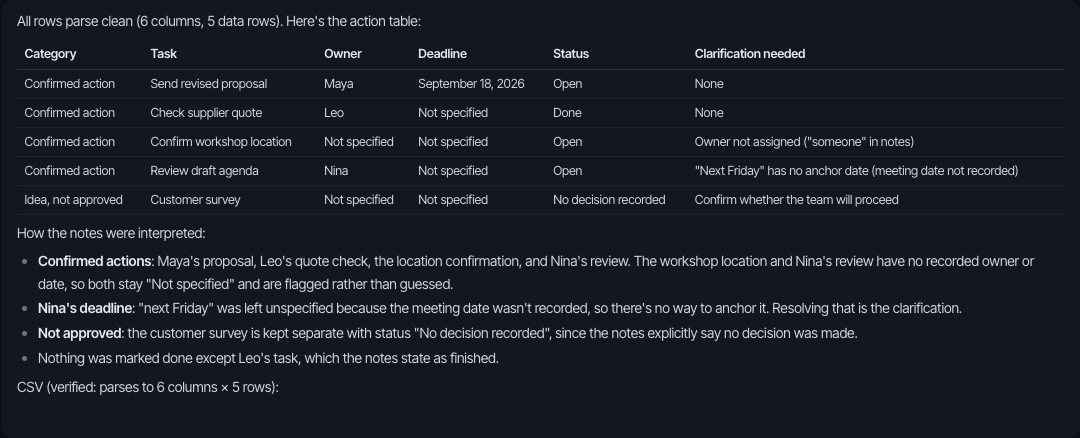
Two details deserve a closer look. Brainmox added a Category column to separate actions from ideas, so the file has six columns rather than the five requested. That matters if you’re importing into a tool that expects a fixed format.
The explanation also groups the workshop and agenda items as having “no recorded owner or date.” That’s loose wording: Nina is already named. The table and CSV correctly leave only her deadline unresolved.
The correction
We then supplied two clarifications:
Omar owns confirming the workshop location; no deadline is agreed. Nina’s agenda review is due September 25, 2026.
The follow-up asked for a revised table and CSV, with everything else unchanged.
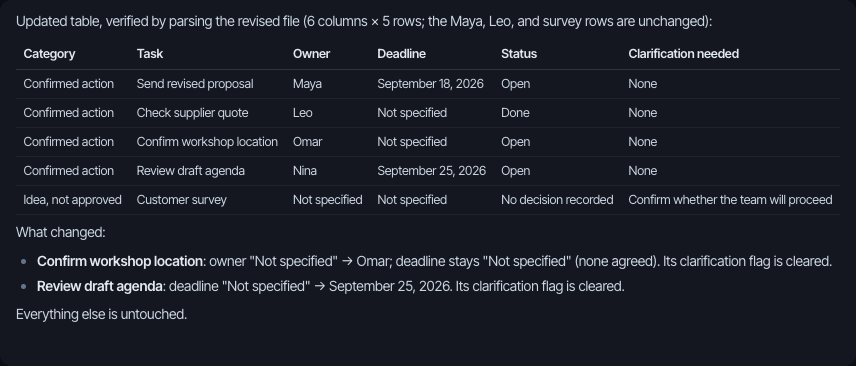
We parsed both CSVs and compared every cell. Each file has six columns and five data rows. These are the only changes; the two original clarification messages are shortened here:
| Field | Initial file | Revised file |
|---|---|---|
| Workshop owner | Not specified | Omar |
| Workshop clarification | Owner not assigned | None |
| Agenda deadline | Not specified | September 25, 2026 |
| Agenda clarification | No anchor date for “next Friday” | None |
Maya’s proposal, Leo’s quote check and the survey row are unchanged.
Before using this for real work
This run produced the requested action list and applied the corrections without changing other cells. It doesn’t establish how reliably the same task would work across repeated runs or longer notes, and we didn’t measure time saved.
The review used two screenshots and two CSVs, not a full chat export or activity log. The assistant’s statement that it sent no messages or created events or reminders was not independently verified. This wasn’t a permissions test.
To repeat the file check, use the fictional notes above, download the first result before asking for a revision, and compare both files. Check the column layout as well as the values. The evaluation scorecard covers the broader checks this small exercise leaves open.
When an agreed action needs a client reply, use these follow-up email examples to ask for the missing approval or document without inventing a deadline.