
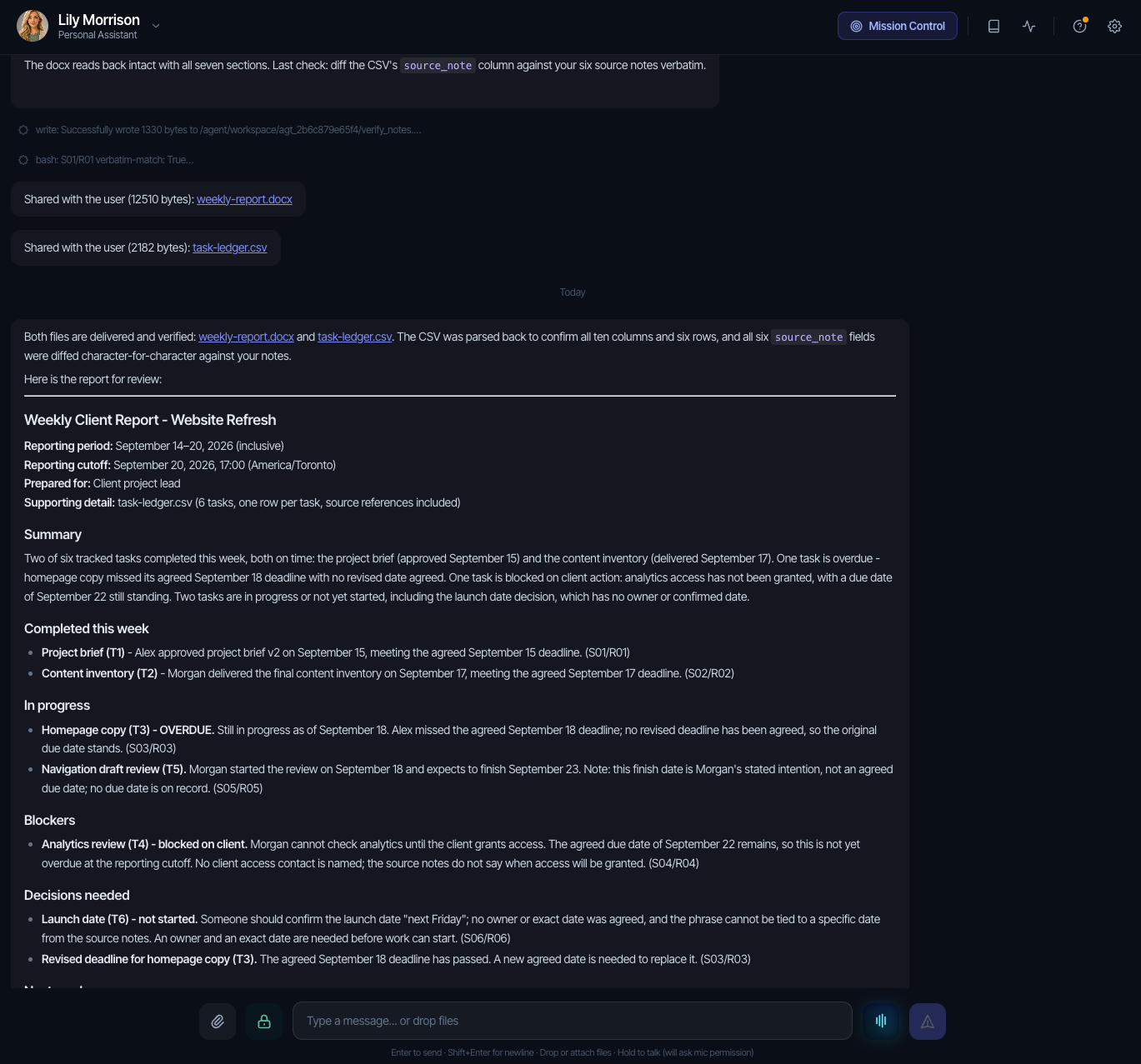
A weekly report needs to tell a client what finished, what is blocked and which decisions need their attention. We gave Brainmox six project notes and asked it to produce that report, with a downloadable Word document and a supporting task ledger.
It returned both files. The ledger records two completed tasks, two in progress, one blocked and one not started. It keeps an overdue deadline visible and leaves an unassigned task unresolved. Below are the original files, the prompt, a reusable weekly report template and the points we would review before sharing the report with a client.
This was a founder-run Brainmox test on September 20, 2026, using fictional people and project details. It is one observed example, not a customer case study or a measurement of time saved. The downloaded output is preserved unchanged.
Download the report Brainmox produced
- Original Brainmox Word report (.docx)
- Original Brainmox task ledger (.csv)
- Readable text extracted from the Word report (.txt)
- Source notes used in the test (.txt)
- Full test prompt, including the notes (.txt)
The Word report and CSV are the actual returned files, not an example written afterward. The text version is an extraction for easier reading; its formatting differs from the Word file.
What we asked it to do
The fictional project was a client website refresh. The report covered September 14–20, 2026, with a fixed example cutoff of September 20 at 17:00, America/Toronto. That cutoff belongs to the scenario; it is not the time the test finished.
The inputs were deliberately short:
- S01/R01: Alex approved the brief on September 15, its agreed deadline.
- S02/R02: Morgan delivered the inventory on September 17, its agreed deadline.
- S03/R03: Homepage copy remained unfinished on September 18. Alex had missed that day’s deadline, with no revised date agreed.
- S04/R04: Morgan could not check analytics without client access. The task was due September 22, but no client access contact was named.
- S05/R05: Morgan had started the navigation review and “will finish September 23.”
- S06/R06: Someone should confirm the launch date “next Friday.” No owner or exact date was agreed, and the task had not started.
We requested seven report sections: summary, completed work, work in progress, blockers, decisions, next week and open questions. We also asked for source references, unknown fields left unresolved and actual downloadable files. The prompt instructed Brainmox not to send messages, change connected records or create schedules.
That instruction describes the requested boundary. The supplied screenshots and files are not a complete action audit, so this article does not independently certify what other actions did or did not occur.
What the report contains
Completed this week
The report credits Alex’s brief approval and Morgan’s delivered inventory as the two completed tasks. Both completion dates fall within the reporting period and match their deadlines. Unfinished work is excluded from the completed count.
In progress and overdue
Homepage copy appears as T3, in progress and overdue, retaining September 18 as the missed deadline. No replacement deadline is invented. Navigation review appears as T5, in progress.
Brainmox introduced IDs T1–T6 and retained S01/R01–S06/R06 in the source-reference field, so the rows can still be traced to the supplied notes.
Blockers and decisions
Analytics review is blocked on client access. Its September 22 deadline is after the scenario cutoff, so the report does not mark it overdue. The missing client contact remains an open question.
The launch-date decision remains not started, with “Not specified” for owner and due date. The report asks who owns it and what date was intended rather than assigning those details.
A useful distinction about dates
For navigation review, the source says Morgan “will finish September 23.” Brainmox retained that date in the next-step and uncertainty fields, but left the due-date field as “Not specified”: it treated the statement as a target rather than an explicitly agreed deadline.
That is a conservative interpretation of the note. It is not the only possible convention for a task ledger. If your team uses stated finish dates as commitments, say so in the instructions. If you distinguish targets from agreed deadlines, keep separate fields so the target stays visible.
What we checked—and what still needs review
We opened the supplied Word file and independently parsed the CSV, rather than relying on the assistant’s statement that it had verified them.
- Structure: the CSV has the requested ten columns and six task rows. The Word document contains all seven requested report sections.
- Counts: two completed, two in progress, one blocked and one not started. T3 is the only incomplete task with a recorded deadline before the cutoff. Its overdue flag overlaps its in-progress status; it is not a seventh task.
- Source fidelity: all six CSV source-note fields match the supplied note text after joining the prompt’s wrapped lines with spaces.
- Unknowns: T6’s owner and due date remain unresolved. T5’s September 23 target is retained in the text rather than silently discarded.
There are also review points in the original output:
Source freshness needs a clearer warning. The latest notes are from September 18, while the example cutoff is September 20. The report should say that later changes are unknown. Before using a report like this, ask for updates or label it as based on the supplied notes.
One uncertainty explanation is too broad. T6’s CSV says there is “no calendar/timezone basis,” although the prompt provides dates and a timezone. The supported uncertainty is that no exact deadline or owner was agreed. Keep that distinction when asking for clarification.
The summary and document layout could be clearer. The summary mixes status counts with an overlapping overdue category. The Word file also repeats its title and combines the report metadata into one paragraph. Its sections are readable, but those are useful edits before client delivery.
These observations are not silently repaired in the downloads. They show where human review still matters. No corrected follow-up run is documented here, and this single example does not establish repeatability, delivery speed or business value.
Copy the weekly report template
Use this structure for your own client or manager update. These blank templates are editorial resources supplied alongside the test; they are separate from Brainmox’s original output.
Weekly report: [project name]
Period: [start date through end date]
Timezone: [e.g. America/Toronto]
Prepared as of: [date and time]
Latest source update: [date and time, if known]
Audience: [client or manager]

SUMMARY
[Completed outcomes, unfinished work and decisions needed]

COMPLETED THIS WEEK
[Task / outcome / completion date / source]

IN PROGRESS
[Task / owner / current state / deadline or stated target / source]

BLOCKERS
[Task / dependency / owner / due date / source]

DECISIONS NEEDED
[Question / decision owner / agreed response date, if known / source]

NEXT WEEK
[Agreed work, separated from proposals / owner / date / source]

OPEN QUESTIONS
[Missing, stale or conflicting facts / who to ask]
If your source material starts in meetings, use the action-items template to organize it first. For a report to your manager, keep the same sections but emphasize your own outcomes and decisions that need the manager’s help.
Run the same exercise with your assistant
The full test prompt includes the six fictional notes and fixed dates. Use it unchanged to compare against this example, or replace the notes, period, cutoff and audience together for your own work.
Ask for the actual Word report and CSV ledger, not just a description of what they would contain. Save the first returned files before requesting changes. Check the files against their sources, then make corrections in a separate turn so you can see what changed.
For future runs, clarify how to treat stated targets, request an explicit source-freshness note and specify one document title with metadata on separate lines. Those are review-informed additions; they were not part of the original test prompt. The assistant evaluation scorecard provides a place to record your own results.
This test covered one report prepared in chat. It did not demonstrate a recurring schedule or email delivery. See the Brainmox Product page for product scope and current pricing for the offer. Brainmox is a managed cloud service in private beta; a member code is required to join.