
Your AI agent, in Outlook and Microsoft 365.
Connect Outlook mail and calendar, OneDrive, Excel, Contacts and To Do. Your Brainmox agent reads, drafts and organizes there, at the access level you choose.
Six services.
One agent across them.
Outlook mail
- Searches and reads your mail, threads and attachments
- Writes replies and new emails as drafts in Outlook
- With Full access, sends, replies and forwards for you
- Flags, categorizes, moves and files mail into folders
Outlook calendar
- Lists and reads events, including recurring meetings
- Creates, updates and cancels events; Outlook emails the attendees
- Accepts or declines invitations
OneDrive, Word, Excel and PowerPoint
- Searches, opens and downloads files, or saves them as PDF
- Edits Word, Excel and PowerPoint files and saves them back
- Uploads, renames, moves and shares files and folders
Contacts and To Do
- Looks up, adds and updates your Outlook contacts
- Reads and manages your Microsoft To Do lists and tasks
- Imports your open To Do tasks into Brainmox Tasks
Each connection has a level.
Change it any time.
Connect one service at a time in Agent settings → Connectors → Microsoft 365. Pick the access level and which of your agents can use it.
Read-only.
Your agent searches and reads, and your account stays exactly as it is.
Draft.
For Outlook mail: your agent reads and writes the drafts, and you press send.
Full.
It can send email, change events, edit files and update contacts and tasks for you.
Outlook works with
your Tasks too.
Inbox and calendar into tasks.
Brainmox can turn Outlook mail and events into tasks in your Incoming queue. When you reply from Outlook, the task settles.
Routines that wait for mail.
A scheduled routine can check your Outlook inbox first and run only when something new has arrived.
Your calendar beside your tasks.
Outlook calendars show in the calendar widget, and a task can be linked to an Outlook calendar.
Sign in with Microsoft.
Use your Microsoft account to sign in to the Brainmox web and desktop apps.
Listed and verified
by Microsoft.
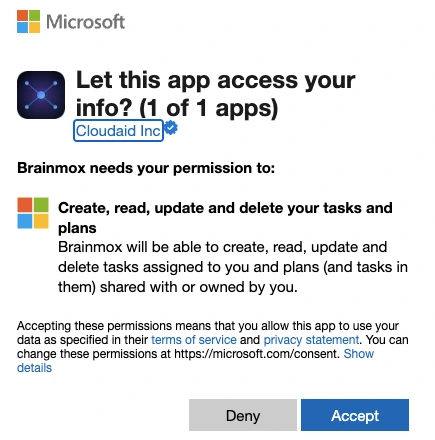
Brainmox is available on Microsoft Marketplace and is a verified publisher on Microsoft. When you connect a service, Microsoft's own screen shows the app, the blue verified badge and exactly what you're allowing.
- Available on Microsoft Marketplace
- Verified publisher: Microsoft confirms who publishes Brainmox
- Member of the Microsoft AI Cloud Partner Program
- You see exactly what each connection allows before you approve

Questions,
answered.
Does it work with a personal Outlook.com or Hotmail account?
Who sends the email?
How do I remove access?
Is Brainmox on Microsoft Marketplace?
Do I need Microsoft and Google?
/ More integrations
Ready for your own AI agent,
with people looking after it?
We're in private beta and take a small number of clients so each one gets real attention. Join the waitlist and we'll invite you when we can onboard you properly.