Product

Meet your AI
Personal Assistant.

Not a chatbot. A full team member with a name, a memory, and the tools to finish the job.

/ Inside Brainmox

See Brainmox
at work.

Real private-beta screens from a demo account. No conceptual mockups.

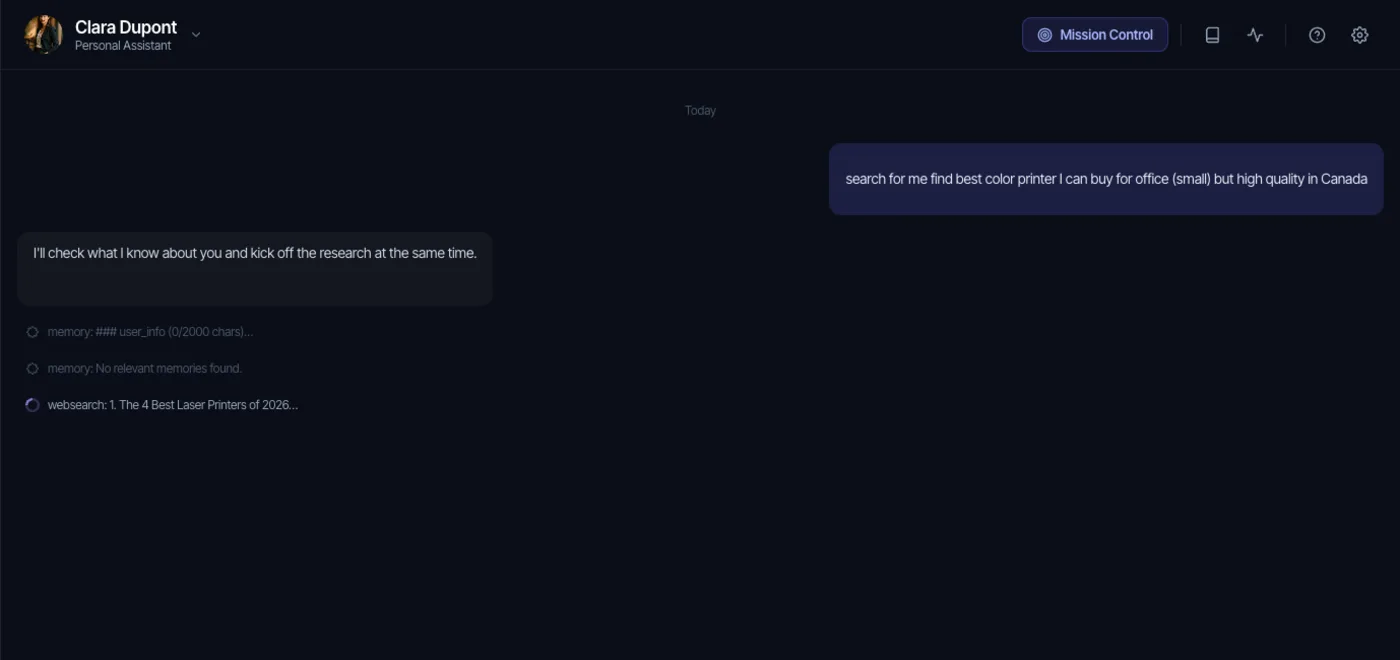
Brainmox conversation showing Clara checking memory and running web research for an office printer request Open full-size
/ Work in progress

See what your assistant is doing.

The conversation shows memory lookup and web research while the task is running, instead of hiding tool activity behind a generic loading state.
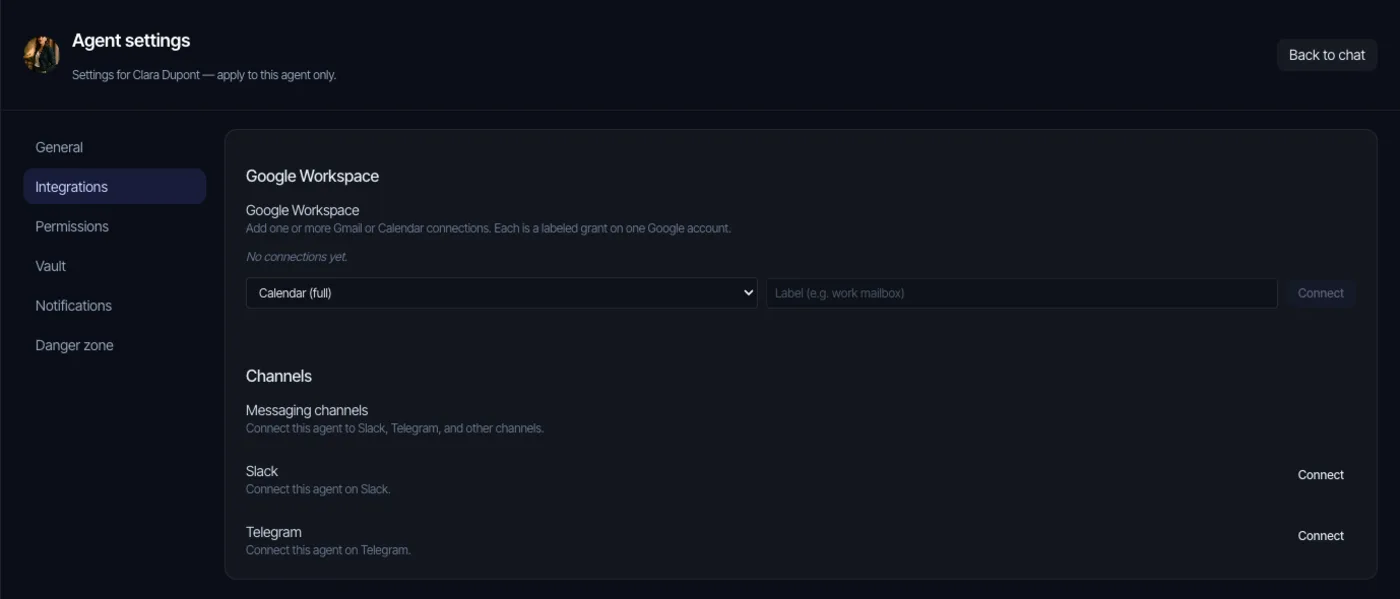
Brainmox agent settings showing Google Workspace, Slack, and Telegram connection controls Open full-size
/ Connected work

Connect services per assistant.

Agent settings expose Google Workspace and messaging-channel connections alongside separate permissions and vault controls.

/ Who it's for

Built for professionals who are
tired of babysitting AI.

01
Founders
Who need an assistant that works at any hour, in any timezone.
02
Consultants
Juggling client research, follow-ups, and document work across a dozen threads.
03
Operators
Running recurring workflows: reports, sweeps, and monitors.
04
Anyone
Who has tried generic AI tools and walked away wishing for a real assistant.
/ Capabilities

What your assistant
can actually do.

It has an identity.
Generated with a name, bio, personality, avatar, and voice. The configured identity stays consistent across supported channels.
It has long-term memory.
Persistent conversations, memory records, and knowledge can carry relevant preferences, decisions, and project context across sessions.
It works with files end to end.
Open, create, edit, copy, move, and search workspace files, including Word, Excel, PowerPoint, and PDF documents. Finished files can be delivered directly in chat for download.
It keeps structured records.
Maintain CRM records for contacts and businesses, add fields as your work evolves, link related records, and update existing matches instead of creating duplicates.
It browses the real web.
Full page reads, not just search snippets. JavaScript-heavy apps and headless-browser automation when a site needs real interaction.
It searches professionally.
Web, news, image, place, shopping, scholarly, maps, and weather tools are available when enabled for the agent.
It runs shell commands.
A hardened sandbox with a command validator that blocks dangerous patterns before they reach your system.
It generates images.
Text-to-image directly in the conversation, rendered inline.
It extracts from PDFs.
Drop a contract, report, or invoice. It reads, summarizes, and acts.
It works across connected accounts.
Connect Gmail, Calendar, Drive, Sheets, Docs, Contacts, Tasks, and Dropbox with the access level you grant. Gmail includes a draft-only option so your assistant can prepare messages without sending them.
It messages everywhere.
Same agent, same memory, on Telegram, Slack, WhatsApp, webhooks, or WebSocket. Hook it into wherever you already work.
It runs on a schedule.
Configure one-time or recurring jobs such as briefings, inbox reviews, monitors, and reminders; review the output and permissions for each workflow.
It runs real projects.
Mission Control gives your agent a plan-and-task board with approvals, deliverables, and autonomy modes — from approve-every-step to fully autonomous.
It delegates.
For bounded research or specialized tasks, it can assign a subtask to a child agent and return the result to the main run.
/ Under the hood

Serious engineering
under a friendly face.

01 Powered by leading models — Claude, GPT, Groq, and more — with automatic failover between providers.
02 Extended thinking for complex reasoning, with automatic graceful degradation.
03 Layered runaway controls: search deduplication, loop detection, selected call budgets, supported write-action deduplication, and action caps.
04 Encrypted-vault placeholders resolve only for eligible tool execution; ordinary prompt and tool content is not covered by a general sensitive-data scrubber.
05 Encrypted vault (XChaCha20-Poly1305 + Argon2id) for keys, passwords, tokens.
06 Activity records for runs, steps, and tool calls.
07 Multi-channel by default: one agent, many front doors.
08 Flexible runtime: your agent's tools can run in our cloud, on your own computer, or on a dedicated machine.
09 Per-agent tool permissions: you decide how much shell, file, and browser access your agent gets.
/ Your desktop

Your assistant
lives on your desktop.

A desktop app for macOS, Windows, and Linux — plus a web app in any browser. System tray integration, native notifications, and a clean chat UI.

Persistent conversation spaces: rename, color-tag, organize work, and review another space read-only while your assistant is busy elsewhere.
Inline tool-call rendering so you can see what your assistant is doing as it works.
Push-to-talk voice input, with a voice chosen per agent — and spoken replies on Telegram.
Desktop notifications identify which assistant responded when work finishes or a channel message arrives.
Drag-and-drop file handling in chat, routed by file type to context or the agent workspace.
Optional launch at login from the tray on macOS, Windows, and Linux.
/ See it running

See it running
on your machine.

Private beta includes a personal setup session with our team. We install your assistant, walk you through the capabilities, and stay available while you get productive.