
Real estate agents · Private beta · US & Canada

AI agent for real estate agents Your follow-ups, drafted.

Brainmox handles the desk work between showings. It reads your Gmail, drafts replies to new inquiries and open house visitors, adds showings to your Google Calendar and reminds you who you owe a call. You review every email and press send yourself.

Gmail draft-onlyIt writes, you send
WhatsApp, Telegram, SlackMessage it between showings
Google CalendarShowings added for you
US & CanadaSet up by our team
/ The problem

The work after the showing.
It piles up between appointments.

The showing ends and the desk work starts: a reply to the buyer who wants a second look, the disclosure you promised, three new inquiries that came in while you were driving, and the open house sign-ins still on the clipboard. None of it is hard; it's just the part that's easiest to let slip. Brainmox takes that pile off your plate without taking the final word away from you.

/ What it does for you

Your desk work, shown working.

Every screen below replays a real Brainmox demo run on a real estate agent's demo account with test data, except the calendar card, which is an example flow. Emails stay drafts until you send them.

/ Email

It writes the reply.
You press send.

Connect Gmail in Draft mode and your agent can read and compose, but never send. It drafts each reply from the thread and what it knows about the client, and every draft waits for you.

  • Draft mode: read + compose, never sends
  • Replies use the thread and your notes
  • You check each one and send it yourself
See a real Gmail draft test
Replay of a real demo run · example from a real estate agent's account · fictional leads · nothing sent
/ Inbox

It reads the inbox.
You see what's urgent.

Give it your new email and it sorts each thread into what needs action now, what needs your decision and what can wait, with the reason, and drafts the replies for you to check.

  • Urgent, needs your decision, low priority
  • Spots mismatches, like a different sender address
  • Replies stay drafts until you send them
Replay of a real demo run · example from a real estate agent's account · fictional emails · nothing sent
/ Checks itself

It asks
before it guesses.

When the only source is old or missing, it says so. Here it drafts a reply from saved listing details but leaves availability as a placeholder until you confirm it.

  • Names its source and how old it is
  • Leaves a placeholder instead of guessing
  • Nothing goes out until you approve
Replay of a real demo run · example from a real estate agent's account · test data · nothing sent
/ Calendar

Tell it after the meeting.
It updates your calendar.

Connect Google Calendar and your agent adds and updates events from what you tell it, sets the reminder and drafts the follow-up email for you to send.

  • Adds and updates Google Calendar events
  • Reminders and follow-ups from one message
  • Email stays a draft until you send it
Example flow with test data · nothing sent
/ Voice notes

Say it once.
It does the follow-up.

Drop a voice note in the app, or send one on Telegram or Slack. Your agent transcribes it, sets the reminder, adds the tasks and drafts the emails, then tells you exactly what it did.

  • A word-for-word transcript you can check
  • Reminders and tasks from what you said
  • Email drafts only, not sent
Replay of a real demo run · test data
/ Routines

It works on a schedule.
Not only when you ask.

Ask once for a weekday morning briefing or a Friday report. Your agent creates a real scheduled job and shows you exactly when it will run.

  • One-time reminders and recurring jobs
  • Runs in the time zone you set
  • Results arrive in the app or a connected channel
Replay of a real demo run · example from a real estate agent's account · test data
/ Reminders

Drop in your week.
It reminds you on time.

Give it a list of appointments and it sets a one-time reminder before each one, in your time zone, and tells you exactly when each will fire.

  • One-time reminders from a file or a message
  • Your time zone, stated in the reply
  • Results in the app or a connected channel
Replay of a real demo run · example from a real estate agent's account · test data
/ Memory

Tell it once.
It remembers.

Must-haves, deal-breakers and showing feedback you mention in chat go into your agent's own client records and memory. Later it uses them, like scoring new listings against each buyer.

  • Its own client records, not a CRM sync
  • Searchable memory you can review and delete
  • A reason behind every match
How memory works
Replay of a real demo run · example from a real estate agent's account · fictional buyers and listings
/ Client records

It keeps client records.
With the details.

Tell it about your clients and it saves them as its own records, adding fields as your work needs them. A monthly routine then drafts personal check-ins from those details.

  • Its own records, not a CRM sync
  • New fields added as you need them
  • Check-ins drafted, never sent on their own
Replay of a real demo run · example from a real estate agent's account · fictional clients · nothing sent
/ Works like you do

No integration?
It uses the website.

Your agent has its own browser. It opens web pages and web-based tools, reads them and works in them the way you would, so software doesn't need a Brainmox integration for your agent to help. You can watch it live in the Screen.

  • Its own browser, shown live in the Screen
  • Full page reads, not just search snippets
  • You choose which tools it may use
Replay of a real demo run · Ontario real estate example · fictional listing
Join the waitlist We invite agents in small groups and set each one up with you.
/ From the demo runs

Real outputs,
fictional clients.

From a real estate agent's demo account: what the agent produced from fictional listings and clients.

One-page Just Listed flyer for a fictional listing at 24 Linden Ave, built by Brainmox from three supplied photos

Listing launch kit

From listing details and photos: an MLS description, three social captions, a Just Listed email draft and a one-page PDF flyer. It also flags risky fair-housing wording, as a wording review, not legal advice.
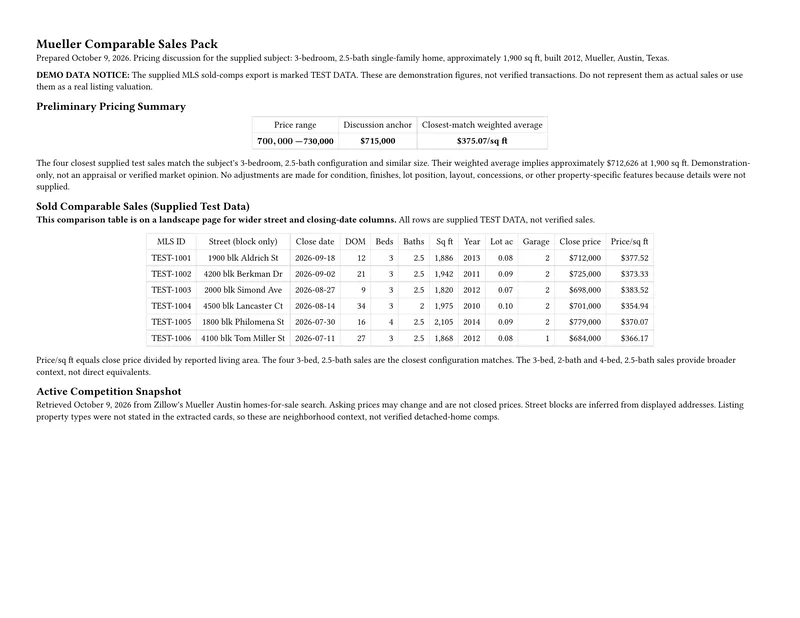
First page of a comparable-sales PDF written by Brainmox, marked demo data, with a pricing summary and a sold-comps table

Comparable-sales pack (US example: Austin, TX)

Word, PDF and Excel built from an MLS export you drop in. When public pages hide sale prices, it asks for the export instead of guessing.
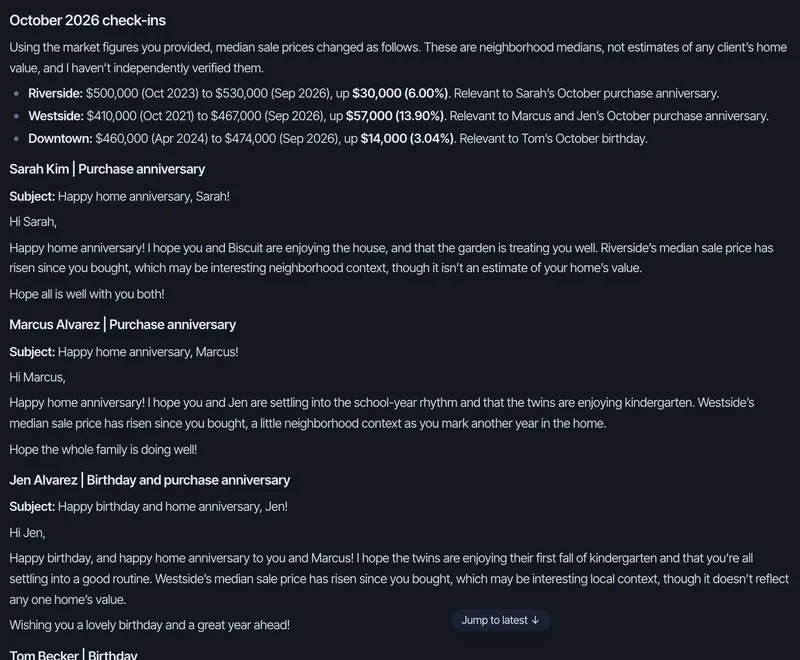
Brainmox reply with neighborhood context and personal check-in email drafts for fictional past clients

Past-client check-ins

A monthly job picks the month's home anniversaries and birthdays from its client records and drafts personal notes. Drafts only, nothing sent.

/ Your first week

Set up with our team,
not a manual.

01

Join the waitlist

Confirm your email. We invite agents in small groups so each one gets a proper setup.

02

Set-up call

Our team connects your Gmail (draft-only), Google Calendar and the messaging app you already use, with you on the call.

03

Teach it how you work

Your email signature, how you like replies to sound, who your current clients are, and how you run open houses.

04

Use it for real

Send it your next showing notes and review the drafts. During the beta you have a direct line to the founding team.

/ Questions

Straight answers.
Including what it doesn't do.

What it doesn't do (yet)

  • No phone calls or texting your leads. Phone handling is planned but isn't available today.
  • No CRM or MLS data sync (Follow Up Boss, Lofty, kvCORE, your MLS). It keeps its own client records and can work in web-based tools in its own browser.
  • Gmail and Google Calendar only. Outlook and Microsoft 365 aren't supported.
  • It isn't a person or a licensed agent, and it doesn't give legal advice.
  • No team seats yet: each account has its own agents.
Does it call or text my leads?
No. It doesn't answer or make phone calls (that's planned, not available yet), and it doesn't send SMS.
Does it connect to my CRM or MLS?
Not as a data sync. It keeps its own records of the clients and properties you tell it about, and it can open web-based tools in its own browser and work in them the way you would.
Will it email anyone without me?
With Gmail connected in draft-only mode, it can't send. It writes drafts and you send them.
Will my clients know it's AI?
Your clients hear from you: it drafts in your Gmail and you decide what each email says before you send it. Brainmox doesn't pretend to be a person; if it ever writes to someone other than you, it says it's an AI assistant.
Can my team or my assistant use it?
Not as shared seats yet. Team accounts aren't available during the private beta; each account has its own agents.
How long does setup take?
The kickoff call is planned for about 30–45 minutes. Teaching continues through the first two weeks as we review its drafts with you.
What about my brokerage's rules?
You stay in control: it drafts, you approve and send, and you choose what it can access. Check your brokerage's policy on AI tools and client data; we'll set it up around it. It doesn't give legal advice.
Is it only for real estate agents?
No. Brainmox is our own AI agent technology for specific professions. Real estate agents are the first, and mortgage brokers are next.
Do you work with agents in Canada?
Yes. The private beta is open to real estate agents in the United States and Canada.
Who is behind Brainmox?
Brainmox is built in-house by CloudAid Inc. in Toronto, led by founder Rez Moss.
/ Free tools and templates
/ Ready when you are

Get your own Brainmox agent.

We set it up with you on a call, teach it how you work, and stay reachable after. Join the waitlist while we're in private beta.